
If you run paid social campaigns for a regulated eCommerce brand—specifically in niches like intimate wellness, reproductive health, or medical supplements—you have likely encountered Meta’s dreaded account diagnostic notification:
“Your conversion events may be blocked because of how your data sources are categorised, which may limit your delivery.”
Every social media platform has its own algorithm and crawlers. Meta take business categories seriously which can impact user’s wealth and health directly or indirectly. Meta’s automated compliance crawlers scan a site and easily detect clinical terms. Meta crawlers aggressively bucket the dataset (Meta Pixel/Conversions API) into a restricted Healthcare & Wellness category. Once locked in, Meta filters data payloads, strips URL parameters, and drops conversion tracking data to comply with global health privacy regulations.
The result? Ad campaign delivery immediately goes down and cost per acquisition goes high. It can also break the attributions and make it impossible for you to run the ads and get sales form meta platform.
Meta Advise
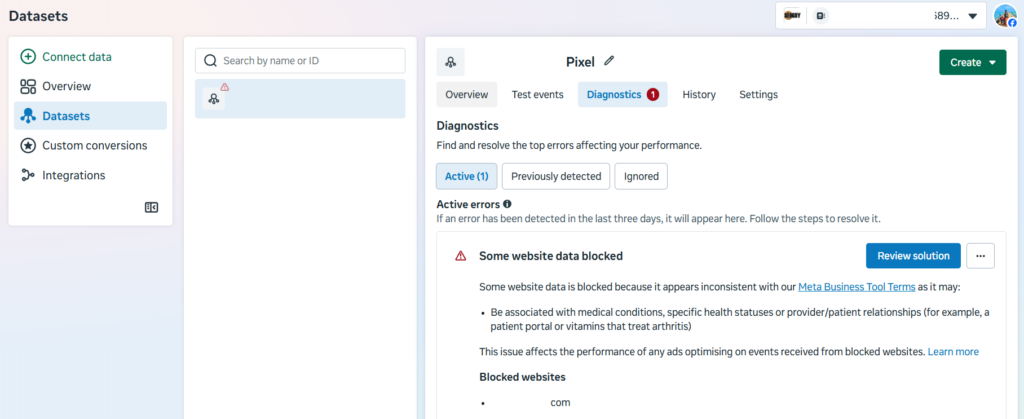
But this is not where the problem ends. Meta will advise you to change the category and request a manual review but if Meta rejects your review, the system permanently locks the toggle. For brands operating under strict regulatory bodies—such as the Therapeutic Goods Administration (TGA) in Australia—changing product names or URL handles on-site to “trick” the pixel isn’t an option. If you misguide user or apply tricks, you might face legal penalties for misbranded therapeutic goods.
We encountered the same problem while running an ad campaign for a intimate hygiene brand in Australia. Today we are going to share some tips which can help you satisfy Meta’s automated privacy filters and keep your web copy 100% compliant with guidelines and local laws.
To begin with, use Google Tag Manager (GTM) as a data translation layer.
The Strategy: Server-Side Data Masking via GTM
The goal is simple: Your real human customers and regulatory auditors must see the exact, legally required medical language on your frontend site. However, the raw data string routed to Meta’s servers must be completely stripped of health-privacy flags before it arrives.
By bypassing the native Shopify-Facebook channel integration (which automatically pushes unmasked product details) and implementing a custom GTM pipeline, you can safely clear the delivery restrictions.
Here is the technical blueprint to build this out.
Step 1: Sanitise content_name with GTM Lookup Tables
Meta’s AI blocks tracking when event payloads (ViewContent, AddToCart, Purchase) explicitly state medical conditions. You can dynamically overwrite these specific strings inside GTM before the pixel payload executes.
- Inside your GTM Web Container, create a new User-Defined Variable named {{LT – Meta Safe Product Name}}.
- Set the Variable Table to a Lookup Table.
- Set the Input Variable to your data layer product name path (e.g., {{dlv – product name}}).
- Explicitly map your clinical titles to generic consumer retail equivalents:
- Clinical Input: “Boric Acid Clarifying Gel” → Output Value: “Clarifying Botanical Gel”
- Clinical Input: “Probiotic Vaginal Suppositories” → Output Value: “Balancing Biome Capsules”
- Clinical Input: “Thrush & BV Support Bundle” → Output Value: “Intimate Wellness Ritual Kit”
Step 2: Rewrite URL Strings Using Custom JavaScript
Because Meta logs every page location URL a visitor hits, clinical slugs (like /products/bv-thrush-relief) trigger immediate flags. Since you cannot change these handles on your CMS, you can instruct GTM to intercept the string and change it inside the payload transmission.
- Create a new User-Defined Variable named {{CJS – Meta Masked URL}}.
- Select Custom JavaScript as the type.
- Deploy a script designed to swap out restricted text fragments dynamically:
function() {
  var rawUrl = window.location.href;
  // Replace clinical tracking strings with generic names before Meta reads them
  var safeUrl = rawUrl.replace(/bv-thrush-relief/g, 'wellness-protocol-1')
                      .replace(/boric-acid-clarifying-gel/g, 'botanical-gel')
                      .replace(/probiotic-vaginal-suppositories/g, 'balancing-capsules')
                      .replace(/thrush-bv-support-bundle/g, 'wellness-kit')
                      .replace(/bv/g, 'balance')
                      .replace(/thrush/g, 'care');
  return safeUrl;
}
Step 3: Overwrite the Meta Tag Schema
With your masking variables successfully built, modify your core Facebook Pixel and Conversions API tags inside GTM to reference them:
- Open your conversion tags and find the Object Properties or Custom Data configurations.
- Hardcode the content_name property to pull directly from your new variable: {{LT – Meta Safe Product Name}}.
- Locate the variable fields responsible for reporting page paths (such as page_location or dl_url). Force the parameter value to pull from your custom script: {{CJS – Meta Masked URL}}.
- Publish your container updates.
Step 4: Disconnect the Native CMS Integration
This option will only work if google tag manager is your source of tracking data. Other native tracking integration within Shopify or WooCommerce, will continue to push raw, unmasked data directly to Meta’s servers, completely bypassing your masking rules. It is advised to turn them off and use GTM only to continue masking.
You must turn off the native channel pixel configurations and handle the complete event stream entirely through your newly configured GTM web and server containers.
Technical Growth Solves Compliance Walls
In highly competitive and legally restricted spaces, standard media buying strategies fall flat. Scaling a wellness brand past ad policy limits requires a deep integration of data engineering and platform compliance understanding.
By applying server-side data remapping, you preserve full regulatory compliance on your domestic storefront while feeding Meta’s algorithmic optimization engines clean, unthrottled performance data.
Relevant Technical & Analytics Guides from TheSEOGuy:
To ensure your broader data architecture and conversion setup remain flawless across all search and paid platforms, review our deep-dive guides:
- Pixel Architecture: Step-by-step instructions on How to Add Google Analytics Tracking to a Website to benchmark clean, first-party data without platform distortion.
- Data Layer Management: Learn how to use tag structures seamlessly in our guide on Google Site Verification Strategies via GTM.
- Funnel Cleanliness: Ensure your server changes don’t create performance friction by tracking your true audience quality with our deep-dive on What is Bounce Rate & User Session Flow.
- Algorithmic Search Scaling: Once your paid tracking is secure, build sustainable organic revenue using our framework on How AI is Transforming E-commerce SEO ROI.
Stuck with a Locked Meta Pixel? Let TheSEOGuy Handle the Engineering.
Navigating the cross-fire between automated Facebook advertising filters and strict country-specific legal regulations requires specialized data expertise. At TheSEOGuy, we look past simple surface rankings to build resilient, server-side data pipelines for international brands.
If your advertising accounts are suffering from limited delivery, data categorization drops, or broken conversion funnels, don’t let automated bots throttle your revenue scale.
👉 Contact TheSEOGuy Technical Team Today to secure your tracking infrastructure, protect your brand’s data integrity, and unlock your true scaling capability.
FAQs – Conversion Events Blocked
Why did Meta lock my Pixel under the ‘Health & Wellness’ category automatically, and how do I remove it?
Meta’s automated compliance crawlers scan your landing page text, headings, and product descriptions for clinical keywords. Once detected, the pixel is auto-bucketed into a restricted data-privacy tier. You can request a manual review in Events Manager, but if Meta rejects it or locks the toggle permanently, appealing through support rarely works because the restriction is hard-coded into the asset’s automated classification profile.
How can I run ads for sensitive products (like intimate wellness or supplements) without triggering Meta’s automated compliance bots?
By separating your frontend presentation from your backend tracking payload. You must keep your frontend site 100% compliant with local legal bodies (like the TGA or FDA) while using a data translation layer (like Google Tag Manager) to sanitize and mask medical terms into generic retail equivalents before the data ever reaches Meta’s servers.
My conversion tracking is completely broken and CPA has skyrocketed—is there a workaround that doesn’t violate terms of service?
Yes. Instead of “cloaking” or hiding text from human users and regulators (which violates compliance laws), use Server-Side Data Masking via GTM. This allows real visitors and legal auditors to see authentic medical labels on your store, while automated server scripts dynamically swap out restricted strings in the Meta Pixel and Conversions API payloads to satisfy privacy filters legally.
Should I change my Shopify product page URLs and titles to generic names to satisfy Meta’s pixel?
No. Altering legally required product names, ingredients, or URL handles on your e-commerce store to “trick” an ad platform’s bot can result in severe legal penalties and failed audits for misbranded goods. Always keep your storefront compliant and handle the data adjustment via technical tag management instead.
Why do my standard browser pixels and native Shopify-Facebook integrations keep leaking restricted health data even after I cleaned my ad copy?
Because native out-of-the-box integrations (like the default Shopify-Facebook channel app) automatically push raw, unmasked product variants, titles, and URL strings straight to Meta behind the scenes. To stop the data leaks, you must disconnect native tracking channels and route your entire event stream through a custom Google Tag Manager web and server setup.
Discover more from TheSEOGuy
Subscribe to get the latest posts sent to your email.