Now, recruiters and job seekers will always find a place to be connected, and for such reasons, LinkedIn has made it an excellent source for posting job opportunities. Having posted a job on LinkedIn, the next is managing applicants who show interest in the job, and if you’re asking yourself on how to go about this, don’t worry-we have you covered! Here’s step-by-step guide to help get you moving and navigating LinkedIn’s features while efficiently reviewing job applications. You will learn how to View Job Applicants on LinkedIn.
Step 1: Navigate to ‘Jobs’
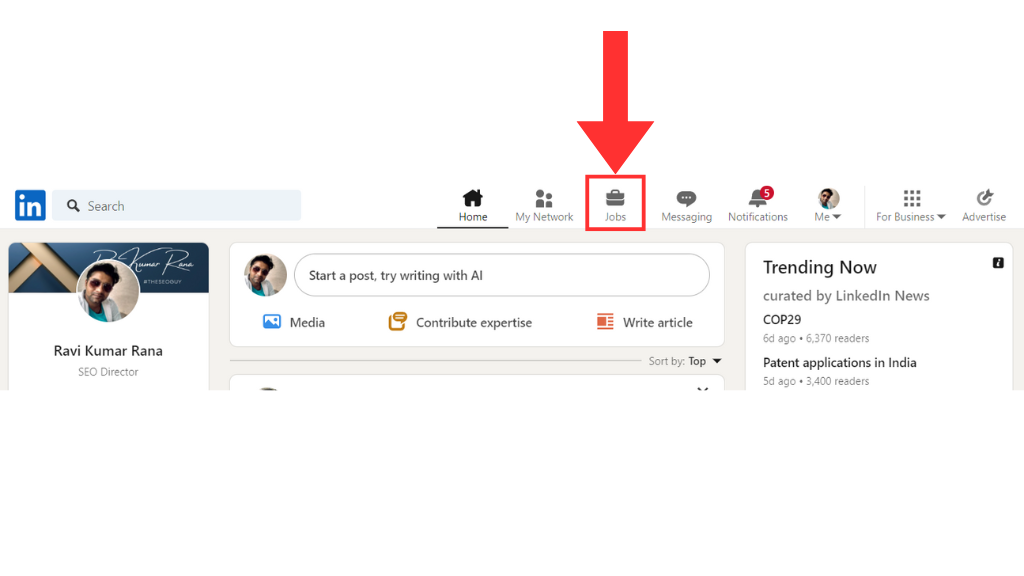
You should first login to your LinkedIn account and navigate your way to the “Jobs” portion. You can easily access the option from your homepage through the navigation bar. It is the central place where all job-related management operations must be performed.
Step 2: Access ‘Manage Job Posts’

From the Jobs section of the dashboard you will have all the “Manage job posts” option. Clicking on this will take you to a dashboard where you will see all of your active, closed, or drafted job posts.
Step 3: Choose the Exact Job Post

You should identify from the list of job posts the one whose applicants you would want to view. Just click on the title of the job post to proceed to its details page.
Click on the three dots of job post and select “Manage Jobs”.
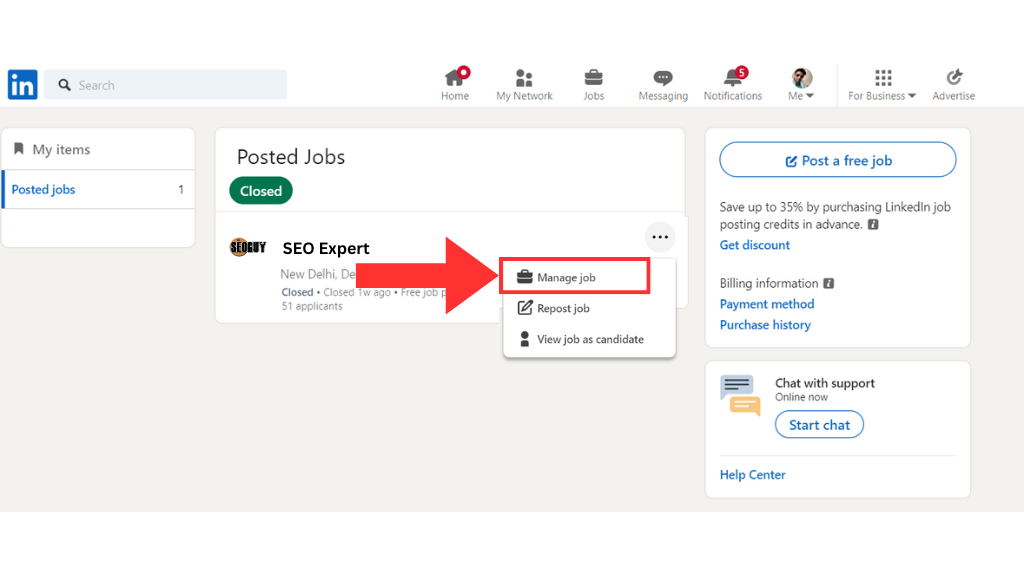
After clicking on manage jobs, you will land on the job post page.
Step 4: Click ‘View Applicants’
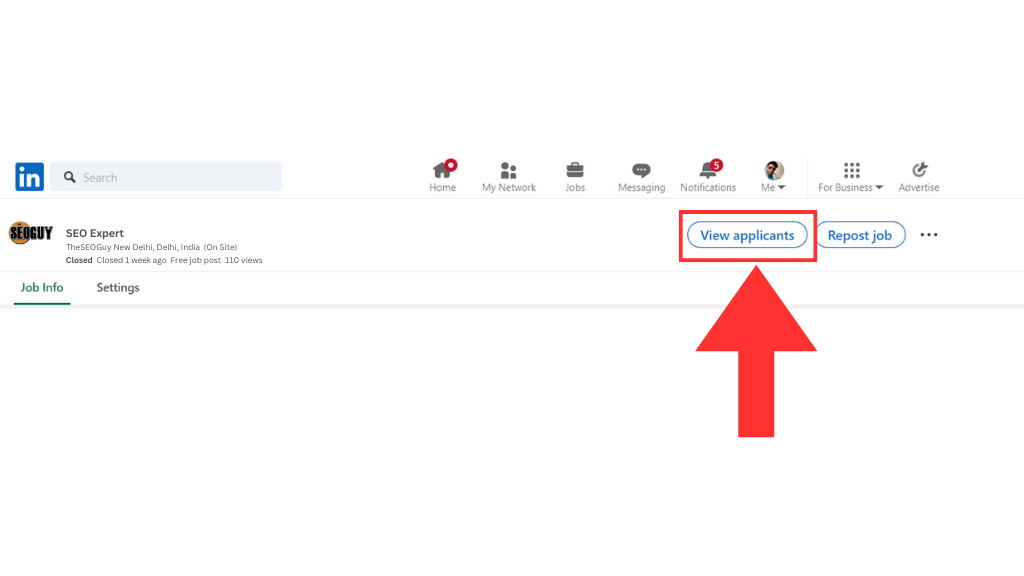
On the job details page, you will find an option labeled “view applicants.” Clicking on it opens a list containing all the individuals that have applied for a position. Here is where you can access information broken down into:
- Applicants’ LinkedIn profiles.
- Resumes, if attached.
- Responses to any screening questions you included when creating the job.
- Step 5: Review and Take Action
- From the applicants’ list, the following can be done:
- Profile view for knowing the candidate’s skills and experience
- List or reject directly
- Download the resume on an offline reference
- Job applicant follow up through direct messages to come in for interview
Why This Feature is So Valuable?
LinkedIn doesn’t just relieve the headache of managing job applications, but it also allows you to get direct insights into a candidate’s professional background. Its intuitive user interface and seamless integration with LinkedIn profiles offer high leverage to hire professionals.
Pro Tips for Better Recruitment on LinkedIn
- Optimize Your Job Description. Use easy language and include relevant keywords to attract the right set of people.
- Utilize Screening Questions. Add thoughtful questions that weed out irrelevant people at the onset.
- Engage with Applicants Quickly. The quicker you engage, the more likely you are to win the top performer before others do.
Using the above steps, you can strategically manage and review your job applicants for a smooth recruitment process. If you want to learn ways of mastering LinkedIn or other SEO-related skills, do not forget to keep following The SEO Guy for more interesting tips and insights!
If you are looking for a trusted Social Media Marketing Agency in Delhi NCR, you are at right place. Talk to our experts today at +919968182198
Hope this guide on “How to view Job Applicants on LinkedIn” answers your question. Comment below your feedback for above information.
Discover more from TheSEOGuy
Subscribe to get the latest posts sent to your email.