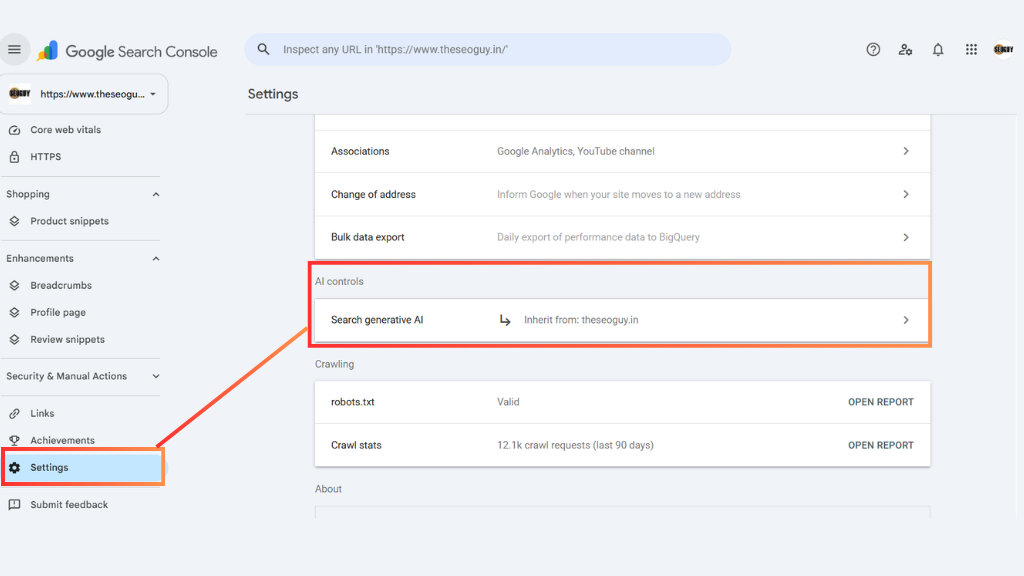
Google’s Search Generative AI Control in Search Console allows website owners to explicitely opt-in or opt-out of having their pages cited, linked, or used as grounding data inside Google AI Overviews, AI Mode, and generative Discover features. While opting out prevents content cannibalization in “zero-click” AI answers, staying opted in (the default state) is vital for brands striving to capture citations and referral traffic through Generative Engine Optimization (GEO). Managing parent/child property inheritance cleanly ensures full search engine and AI engine visibility without risking silent traffic drops.
At TheSEOGuy, we help businesses transition from traditional organic search rankings to multi-model AI visibility across Google, ChatGPT, and Perplexity. Understanding how to govern this new Search Console setting is critical for protecting your digital footprint and scaling your organic pipeline.
What is Google’s Search Generative AI Control?
Google has added a dedicated setting under Settings > Search generative AI inside Google Search Console (GSC). This property-level control determines whether Google’s automated generative systems can include your website’s links, snippets, and content within generative AI search features (like AI Overviews and AI Mode).
The 3 Core Options:
- Include my site’s links and content: (Default) Allows your website to be featured as a cited source, generate link cards, and ground AI-generated responses.
- Exclude my site: Prevents links or content from appearing in generative AI responses. (Note: Excluded pages can still appear in traditional organic blue-link search results; it does not affect standard indexing or rankings).
- Inherit control from parent: Applies to child properties (e.g., URL-prefix verifications like
[https://www.theseoguy.in/](https://www.theseoguy.in/)) so they automatically match the master setting established at the Top-Level Domain Property (theseoguy.in).
4 Crucial SEO & GEO Angles Every Business Must Understand
1. The Strategy: To “Include” or “Exclude”?
The biggest question SEO strategists face is whether keeping the default “Include” setting is beneficial.
- Why Stay Included (The GEO Advantage): If your goal is brand authority and capturing high-intent conversational traffic, you must remain included. Being cited inside an AI Overview positions your brand as a vetted entity and drives qualified referral traffic.
- When to Consider Excluding: Publishers, news outlets, and sites that rely heavily on ad impressions or direct pageviews may consider opting out if AI summaries satisfy the query directly on the Search Engine Results Page (SERP)—causing zero-click searches. However, opting out does not stop the AI response; Google will simply summarize a competitor’s content instead.
2. Safeguarding Domain Inheritance (Preventing “Dark Spots”)
A common pitfall inside multi-version Search Console accounts involves Property Inheritance.
- If a domain-level property is set to “Include,” but an older HTTP or subfolder child property is accidentally overridden and set to “Exclude,” Search Console creates conflicting instructions.
- The Risk: Google may drop entire sections of your site from AI Overviews because a child property was manually set to Exclude. Always verify that all subfolders and protocol variants are set to “Inherit control from parent”.
3. Disentangling AI Visibility from AI Training
It is crucial to distinguish this feature from Google-Extended or robots.txt disallows:
- The Search Generative AI Control only governs whether your site appears inside Google Search AI features.
- It does not stop web crawlers from training foundational LLM models. If you want to block AI training, you must manage
Google-Extendedseparately.
4. Alignment with GSC’s Generative AI Performance Report
Alongside this toggle, Google introduced the Generative AI Performance Report under standard Search Console analytics. Before changing your inclusion settings, review this report to see how many AI impressions your site receives. Disabling this feature blindly could strip thousands of brand touchpoints overnight.
How to Audit Your Search Generative AI Settings
| Step | Action | Why it Matters |
|---|---|---|
| 1. Domain Property Check | Log into GSC and open your master Domain Property. | Establishes the primary governance rule across all subdomains. |
| 2. Audit Inheritance | Check every URL-prefix child property to ensure it states “Inherit control from parent”. | Prevents accidental exclusion of sub-paths or HTTP versions. |
| 3. Baseline Visibility | Review impressions in the Generative AI report. | Provides real data on your brand’s AI search footprint before making changes. |
| 4. GEO Content Optimization | Restructure top pages with BLUF answers, concise schema, and entity-rich tables. | Maximizes the likelihood that Google’s generative models select your content as a primary source. |
Search Generative AI Control Feature – FAQs
Does excluding my site from Search Generative AI lower my organic rankings?
No. Google has explicitly confirmed that the Search Generative AI Control operates independently of standard organic ranking algorithms. Your site can still rank #1 in classic organic results even if excluded from AI features.
How long does it take for a setting change to take effect?
When you toggle between Include or Exclude in Search Console, it generally takes 1 to 2 days to propagate across Google’s systems due to server caching.
Can I exclude specific blog posts while leaving the rest of the site included?
No. The Search Generative AI Control is a property-level setting in Search Console. You cannot cherry-pick individual URLs within the same property; it applies site-wide or at the sub-property level.
Ready to Claim Your Brand’s Spot in AI Search?
Navigating the transition from traditional SEO to Generative Engine Optimization (GEO) requires more than toggling settings—it requires a complete content and entity strategy.
At TheSEOGuy, we help mid-market and enterprise businesses optimize their digital presence to secure citations in Google AI Overviews, ChatGPT, and Perplexity.
Book a Strategic GEO & SEO Audit with TheSEOGuy Today and discover how your business can capture market share in AI search results.
Discover more from TheSEOGuy
Subscribe to get the latest posts sent to your email.